Analysis Build · fit-out cabling
Fibre Optic Infrastructure for Data Centres: Optics, Cabling and Testing
Compare four 400G optics, work through a 120 m fibre channel, and specify connectors, routes and acceptance tests.
Key takeaways
- Choose fibre using the exact transceiver, the optical module that sends and receives the signal. Fibre grades have no single speed ceiling.
- The four named 400G examples below use different connectors and fibre counts. Their published reaches are specific to those modules.
- For a 120 m channel, check the worked example before specifying OM4 or OM5 multimode fibre.
- Document the cable route and supplier installation limits. Agree project-specific civil works and physical diversity requirements.
- Accept the installed channel against its loss, length and polarity limits. Include inspection and any required reflection tests.
Start a data-centre fibre specification with the equipment ports and the complete cable route, including patch cords. Then select a compatible fibre type and connector arrangement. The comparison below shows how different the cabling can be for four modules carrying the same 400 Gbit/s Ethernet rate. It is a planning example; final acceptance also needs the selected module’s optical limits.
Fundamentals of Fibre Optics for Data Centres
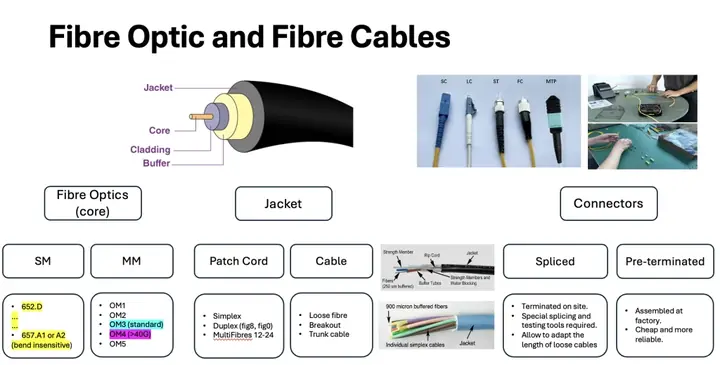
Single-mode fibre carries one light-propagation mode; multimode fibre carries several. OM3, OM4 and OM5 identify multimode fibre grades. A grade alone does not specify a link’s usable rate and distance. Those depend on the optical application, as the Cisco module specifications below demonstrate.
For single-mode installations, distinguish the fibre specification from the finished cable’s handling limits. ITU-T G.657.A1 and G.657.A2 belong to the bend-insensitive category A family. The ITU-T G.657 summary says category A complies with G.652 while improving bend performance. Corning’s assembly portfolio includes fibre meeting both ITU-T G.657.A1 and ITU-T G.652.D. Specify the required grades explicitly.
For installation, use the cable supplier’s minimum bend radius and maximum pulling load. The radius permitted while pulling can differ from the installed limit. Corning’s duct installation procedure directs installers to the particular cable’s specifications. A bare-fibre bend specification cannot replace those cable limits.
Four 400G modules, four cabling choices
These are named Cisco products, not universal limits for all 400G optics. “Active fibres” counts strands carrying signals. MPO numbers describe connector positions; LC is a single-fibre connector used here as a duplex pair. APC and PC/UPC describe connector endface finishes, explained below. Source: Cisco data sheet, module descriptions and Tables 2–3.
| Cisco module | Fibre and published reach | Active fibres | Optical interface |
|---|---|---|---|
| QDD-400G-SR8-S | OM3: 70 m; OM4: 100 m | 16 | MPO-16 APC |
| QDD-400G-SR4.2-BD | OM3: 70 m; OM4: 100 m; OM5: 150 m | 8 | MPO-12 UPC |
| QDD-400G-DR4-S | Single-mode: 500 m | 8 | MPO-12 APC |
| QDD-400G-FR4-S | Single-mode: 2 km | 2 | Duplex LC PC/UPC |
Worked choice: assume a 120 m total channel, including patch cords. It exceeds the listed OM4 reaches. The listed SR4.2 module supports that distance on OM5; DR4 and FR4 provide single-mode alternatives. Their fibre counts differ. These specifications establish no price or power advantage.
Reach alone cannot approve a heavily patched channel. Check switch compatibility and required forward error correction, which repairs transmission errors. Also verify the module’s insertion-loss budget, the permitted signal loss through the channel. Check reflectance, the light returned towards the source, and polarity, the mapping of fibres between ports.
Cable Types for Data Centres
A patch cord is a connectorised cable used to join ports or patch panels. In cable descriptions, simplex means one fibre and duplex means two. The strand count alone does not determine traffic direction. Loose-tube construction groups fibres inside protective tubes with room for limited movement. Breakout construction gives fibres individual jackets within the cable. These are construction choices, described in STL’s indoor cable application note.
A trunk assembly carries multiple fibres between termination points. Confirm fibre count and the connector arrangement at each end when ordering. Corning distinguishes trunks from harnesses that split a multifibre connector into individual connectors. Choose the assembly to match the equipment and installation environment.
Connectors: When to Use MPO
Single-fibre connectors
LC and SC each connect one fibre per connector. A duplex LC pair connects two fibres, as in the FR4 example above. Match the equipment interface and patch-panel adapters; the connector name alone does not specify its polish. Corning’s connector guide describes LC and SC options.
Multi-fibre connectors
MPO means multifibre push-on: one connector aligns several fibres. MTP is US Conec’s brand of MPO connector. Its catalogue includes several fibre arrangements. Record connector positions, active fibres, polarity and gender, meaning whether alignment pins are present. The SR4.2 and DR4 examples both use eight active fibres in a 12-position connector, with different polishes.
PC means physical contact; UPC means ultra physical contact; APC means angled physical contact. UPC has a slightly rounded endface, while APC is angled. Fluke warns against mating APC and UPC: misalignment can impair performance and damage endfaces. Specify matching finishes throughout the connection.
Pre-terminated Connectors and On-site Splicing
Factory termination and field splicing are two approaches that can also be combined. Corning’s data-centre interconnect design combines factory-tested assemblies with splice points. Decide which work belongs at the factory and which belongs on site.
Pre-assembled connectors
Factory-terminated assemblies arrive with connectors fitted. Confirm route measurements, service slack and pulling access before ordering their lengths. Include endface inspection and installed-channel acceptance in the handover, even when the supplier provides factory test results.
On-site splice
Splicing joins fibre ends on site. Plan the splice locations, enclosures and working space alongside the cable route. Specify the equipment, installer competence and acceptance records in the work package. Compare complete installation proposals; the termination method alone does not establish total cost.
Outdoor Cabling Infrastructure
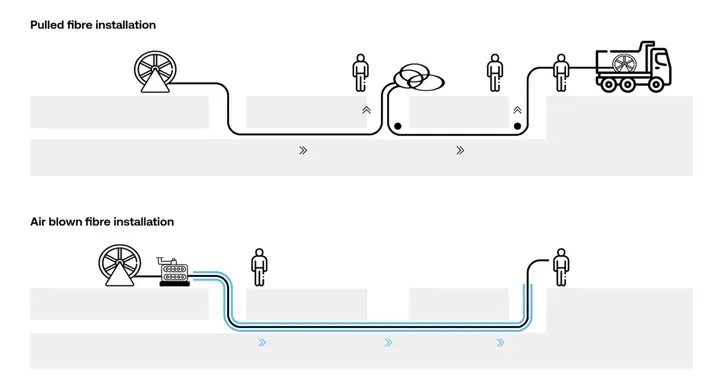
Begin with a route survey and a cable-specific installation plan. Corning’s procedure covers duct and chamber inspection, splice locations and pulling arrangements. Resolve the following items before installation:
- Trenching: agree depth, utility separation, permits and reinstatement with the relevant authorities and utility owners. Record the applicable local requirements in the project specification.
- Ducting: select compatible cable, duct and installation equipment. Check fill, bends, route condition and pulling limits. Blowing equipment pushes cable using airflow; its supported duct range depends on the machine. For example, Condux’s Gulfstream 400 specifies both microduct and traditional innerduct options.
- Access chambers: identify locations for cable access and splicing. Document ownership and maintenance access separately from the physical chamber layout.
Indoor Cabling Infrastructure and Meet-Me-Room
A meet-me room, or MMR, provides space for connections between carrier networks and customer networks. The meet-me-room guide’s cross-connect loss-budget example shows why every connection in that route belongs in the optical calculation.
MMR Function and Design
Document where each service enters, terminates and continues to the customer. Include carrier racks, patching hardware and the installed cables to customer areas. In this guide, MMR means the room; describe individual distribution racks separately in the drawings.
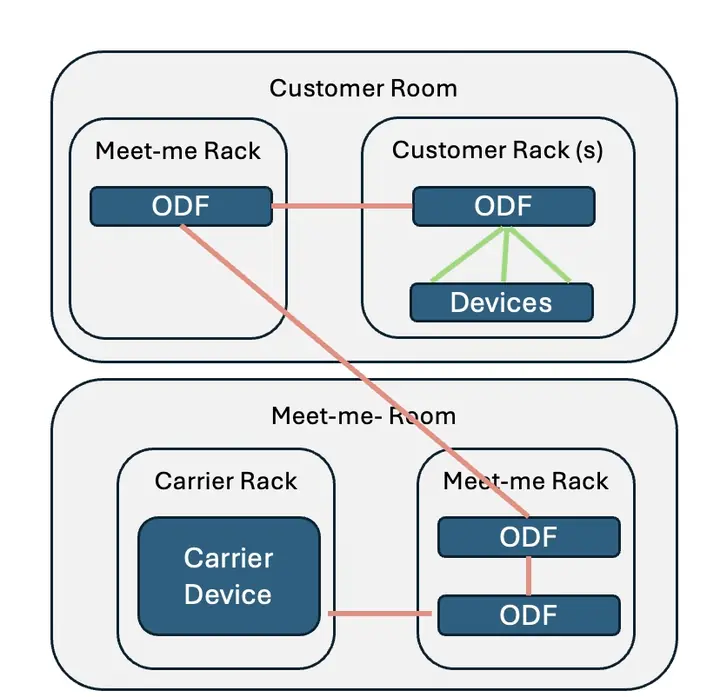
Use the room schedule to record these practical design decisions:
- Carrier racks: assign equipment positions and access responsibilities.
- Distribution hardware: identify the racks and panels where fibres terminate.
- Cross-connects: record the physical connections between carrier and customer ports, with identifiers at both ends.
- Pre-cabling: document installed paths to customer areas and capacity reserved for future services.
MMR Resilience and Route Diversity
Name the certification scheme and edition specified by the project. TIA and Uptime Institute agreed to distinguish their systems in 2014. Do not translate an Uptime Tier label into an assumed room count or separation distance. Check the actual governing requirements with the project’s design and certification teams.
For resilience planning, request drawings of the physical paths behind each service. Record shared ducts, building entries and fire zones, plus access controls and maintenance responsibilities. Multiple providers or rooms alone do not demonstrate independent paths. Use the drawings to identify which failures could interrupt both services.
Fibre Testing Protocols
Agree acceptance limits before installation and retain results against individual fibre identifiers. Fluke’s certification guidance distinguishes basic channel tests from extended characterisation. Passing passive-cabling tests does not certify throughput for every future optical module.
Basic Inspection: Connector Cleaning and Visual Examination
Inspect connector endfaces with appropriate inspection equipment before connection. Clean when necessary, then inspect again. Fluke’s inspection guide applies this sequence to factory and field terminations, including test cords. Cleaning can itself move contamination. Assess remaining defects against the applicable acceptance criteria; do not treat a scratch as removable dirt.
Tier 1 Testing: Loss, Length and Polarity
These testing tiers describe fibre certification, independently of data-centre Tier classifications. Basic testing checks:
- Insertion loss: use a light source and power meter to measure end-to-end signal loss. Compare it with the specified channel limit.
- Length: confirm that the installed channel fits the application’s reach limit.
- Polarity: verify the fibre mapping needed to connect the transmitting and receiving ports correctly.
Record the test method and reference setup with the results. Fluke explains why some single-mode applications also need reflectance checks. A channel can meet a loss limit yet fail another requirement of its intended optics.
Tier 2 Testing: Extended Characterisation with OTDR
An optical time-domain reflectometer, or OTDR, sends light pulses into a fibre and analyses returning light. Its trace helps investigate events along the route. Tier 2 adds this characterisation to basic testing; it does not replace end-to-end loss measurement. Fluke describes the roles of both test levels.
Specify the required traces and test conditions in the acceptance plan. Investigate unexpected events before handover, and keep the final records with the route drawings and port schedule.
To know more about optical fibre in data centres, we reached out to Albert Major, PhD in Nuclear Physics and Operations Manager at nLighten, a company known for its innovative data center solutions in Switzerland. Here is his point of view on where he sees the future of fibre infrastructure going in data centres.
“We’re seeing a push toward even higher fiber density and more sophisticated cable management solutions. As demand for data grows, I believe the emphasis will be on integrating new fiber technologies that allow us to transmit more data through the same physical space. Enhanced wavelength-division multiplexing on fibers is just the beginning.